2023 Editable Canva Productivity Planner: Your Creative Command Center
Feeling overwhelmed by the sheer volume of tasks, ideas, and goals on your plate? For coaches, creative entrepreneurs, and small business owners, staying organized isn't just helpful—it's essential for growth and sanity. The 2023 Editable Canva Productivity Planner is more than just a set of pages; it's a versatile digital toolkit designed to bring clarity and structure to your professional and personal life without requiring you to start from a blank canvas.
A Visual Framework for Focused Action
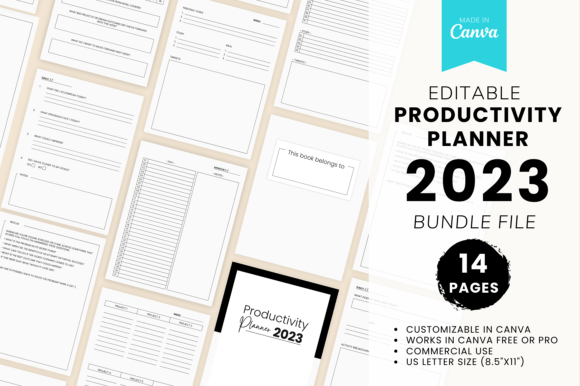
This planner template embraces a clean, modern aesthetic that balances professionalism with approachability. Its visual personality is structured yet flexible, using ample white space, clear typographic hierarchy, and subtle design elements that guide the eye without causing distraction. The overall appeal lies in its neutrality—it acts as a sophisticated backdrop that can be easily adapted to reflect your own brand identity through color, imagery, and font choices within Canva.
The style is decidedly practical. Each of the 14+ pages is meticulously laid out to serve a specific function, from monthly overviews and weekly project tracking to goal setting and reflective journaling. Think of it as a pre-built system for productivity. You’re not getting a decorative piece; you’re acquiring a functional framework. This makes it an incredibly valuable design asset for anyone who needs to create professional planning materials for themselves, their clients, or their audience quickly and consistently.
Practical Applications Across Your Creative Workflow
The true power of the 2023 Editable Canva Productivity Planner is its adaptability. It’s a multi-purpose resource that can be deployed in numerous scenarios. For coaches, it becomes a ready-made client onboarding packet or a quarterly planning guide for group programs. Creative entrepreneurs can use it internally to map out product launches, content calendars, and financial targets. As a lead magnet or freebie, a customized version of this planner offers immense value to your email list, establishing your authority and providing a tangible tool.
Its US letter size (8.5" x 11") and front-and-back design make it perfectly suited for both digital use and print. You can share it as a PDF for digital planning in apps like GoodNotes, or print it out for those who prefer a physical planner. The template includes pages for every key aspect of productivity:
- Strategic Planning: A cover page, "Belongs to" page, monthly planner, and dedicated goal-setting sheets for top 10 targets.
- Project Execution: Weekly project setting pages that can accommodate 1 to 6 projects, personal task lists, study trackers, and meal planning.
- Mindset and Reflection: Pages for weekly reflections with trackers and quotes, affirmation writing, rescue tracker, and a comprehensive review of accomplishments, struggles, impressions, and goals.
- Holistic Balance: Unique pages for soul needs and activity breakdowns, ensuring productivity doesn’t come at the expense of well-being.
Seamless Integration and Customization
What makes this a standout resource is the included Canva template and Getting Started tutorial PDF. You don’t need advanced design skills. With a few simple clicks, you can change colors to match your brand palette, swap fonts to align with your typographic style, add your logo, and incorporate relevant imagery. This process allows you to create a unique planner that feels authentically yours while leveraging a professionally designed structure.
This is where understanding basic design principles pays off. When customizing, consider your font pairing. The template likely uses a clean sans serif font for body text for maximum readability. You might introduce a display font or a subtle script font for headings to add personality, ensuring it complements rather than clashes with the existing modern typography. The goal is to maintain a clear visual hierarchy that guides the user effortlessly through the planner.
Beyond a Single Planner: A Business Building Tool
Think of this purchase not as a one-time buy, but as an investment in a scalable design asset. The core template can be repurposed into a suite of products. Create a "Client Welcome Planner" by adding your branding and specific onboarding steps. Develop a "Content Creator's Quarterly Planner" by modifying the goal-setting and project pages to focus on editorial calendars and platform growth. The structure is there; your application of it is what generates unique value for your specific audience.
For those building a brand, consistency is key. Using this planner as a foundation for your digital products ensures a cohesive look and feel across your offerings. It reinforces your brand identity through consistent use of color, typography, and design language, which builds recognition and professionalism. Whether you're a blogger offering a downloadable resource, a publisher creating a companion journal, or a crafter designing a planner for your community, the 2023 Editable Canva Productivity Planner provides the essential framework to execute your vision efficiently and effectively.
Grab it, customize it, and put it to work. Transform it from a generic template into the central hub for your productivity and the valuable resource your audience will thank you for.